Understanding Order Types on MT5: Market, Limit, Stop, and More
Key Highlights
Market orders offer instant execution but can face slippage in volatile markets.
Limit orders give price control but aren’t guaranteed to execute.
Stop and stop-limit orders help manage risk and catch breakout opportunities.
Trailing stops and OCO orders add flexibility for dynamic market conditions.
BitDelta Pro’s MT5 makes it seamless to place, monitor, and manage all order types — even for beginners.
MetaTrader 5 (MT5) is a high-end trading platform renowned for its advanced features and user-friendly interface. A crucial aspect of trading effectively on MT5 is comprehending the various order types available. This knowledge empowers traders to execute trades strategically, aligning with their specific market perspectives and risk management plans.
What Are Order Types in MT5 Trading?
Order types in MT5 are instructions that traders provide to the platform to execute trades under predefined conditions. They are essential tools that help traders manage their positions efficiently and capitalise on market opportunities. Broadly, these orders are categorised into:
Market Execution Orders: Immediate orders to buy or sell at the current market price.
Pending Orders: Instructions to buy or sell at a specified price point in the future.
Market Orders
A market order is an instruction to buy or sell a security immediately at the best available current price. This type of order guarantees execution but does not guarantee a specific price, especially in volatile markets where prices can change rapidly.
When to Use Market Orders:
When swift execution is prioritised over the exact price.
In highly liquid markets where price slippage is minimal.
Pros:
Immediate execution.
Simplicity in fast-moving markets.
Cons:
Potential for price slippage in volatile conditions.
Lack of control over the execution price.
Limit Orders
A limit order sets the maximum or minimum price at which you are willing to buy or sell a security. A buy limit order is placed below the current market price, while a sell limit order is set above it. This order type ensures price control but does not guarantee execution, as the market may not reach the specified price.
Buy Limit vs. Sell Limit Orders
Buy Limit: An order to purchase a security at or below a specified price, aiming to capitalise on anticipated price increases.
Sell Limit: An order to sell a security at or above a specified price, targeting profits before a potential price decline.
Advantages
Greater control over entry and exit prices.
Useful for executing trades at perceived optimal price levels.
Disadvantages
No assurance of execution if the market doesn’t reach the limit price.
Partial fills may occur if only a portion of the order can be executed at the specified price.
Stop Orders
A stop order, also known as a stop-loss order, becomes a market order once the stop price is reached. Buy stop orders are placed above the current market price and sell stop orders are set below it. This mechanism is often employed to limit potential losses or to enter the market on a breakout.
Buy Stop vs. Sell Stop Orders
Buy Stop: An order to buy a security once its price surpasses a specified level, indicating upward momentum.
Sell Stop: An order to sell a security when its price drops below a specified level, signalling potential further decline.
Role in Breakout Trading
Stop orders can be instrumental in breakout strategies, enabling traders to enter positions as the price breaks through resistance or support levels, anticipating continued movement in that direction.
Stop-Limit Orders
A stop-limit order combines the features of stop and limit orders. Once the stop price is reached, the order becomes a limit order at a predetermined price. This approach provides control over the execution price but carries the risk of non-execution if the market price does not meet the limit criteria.
Functionality in Different Scenarios
Risk Management: Helps in setting precise entry and exit points, mitigating potential losses.
Volatile Markets: Useful when price fluctuations are significant, and exact execution prices are crucial.
Advanced Order Types on MT5
MT5 offers several advanced order types to enhance trading flexibility:
Trailing Stop Orders: These orders adjust the stop price at a specified distance from the current market price, locking in profits while allowing the position to remain open as long as the market moves favourably.
Expiration Types:
Good Till Cancelled (GTC): The order remains active until it is executed or manually cancelled.
Good Till Date (GTD): The order remains active until a specified date unless it has been executed or cancelled before then.
One-Cancels-the-Other (OCO) Orders: A pair of orders where the execution of one automatically cancels the other, allowing traders to plan for multiple market scenarios.
How to Place Orders on BitDelta Pro’s MT5 Platform
Placing orders on BitDelta Pro’s MT5 platform is straightforward:
Log In: Access your BitDelta Pro account and open the MT5 platform.
Select the Asset: Choose the financial instrument you wish to trade.
Open the Order Window: Right-click on the chosen asset and select ‘New Order’ or press F9.
Choose Order Type: In the order window, select the desired order type (Market, Limit, Stop, etc.)
Set Order Parameters:
Enter the volume (lot size), price levels (for pending orders), stop loss, take profit, and any other conditions as needed.
Confirm and Place the Order:
Click Buy or Sell depending on your trade direction. For pending orders, click Place.
Monitor and Manage Your Trades:
Use the Terminal window to view open positions and modify or close them as per market conditions.
Pro Tip: BitDelta Pro’s MT5 interface is intuitive and customisable, making it easy for both beginners and seasoned traders to execute various order types efficiently.
Mastering Order Types for Smarter Trades on MT5
Understanding the different order types in trading is key to building a disciplined and strategic approach on MT5. Whether you prefer instant execution with market orders, price control with limit orders, or risk protection with stop and stop-limit orders – MT5 on BitDelta Pro has you covered.
Mastering these tools doesn’t just help manage risk – it opens up smarter trading opportunities tailored to your style and market view.
Register on BitDelta Pro and trade efficiently with MT5!
How to Use Technical Indicators on MT5 for Better Trading?
Key Highlights
Technical indicators are tools that help traders interpret historical data to predict future price movements, providing structure and clarity in decision-making.
MT5 is a powerful trading platform equipped with 38 built-in technical indicators, offering traders in-depth market analysis capabilities across trend, momentum, volatility, and volume.
Combining indicators wisely (e.g., trend + momentum) and back testing strategies on historical data improves accuracy and reduces false signals.
Avoid common mistakes like relying on a single indicator, overcrowding charts, or ignoring macroeconomic context — a balanced, well-informed approach leads to better trading outcomes.
MetaTrader 5 (MT5) is a high-level trading platform known for its robust analytical tools and intuitive interface. Among its many features, MT5 offers a wide array of technical indicators that are vital for traders aiming to make informed decisions. These indicators assist in analysing market trends, momentum, volatility, and volume, thereby enhancing the precision of trading strategies.
Understanding Technical Indicators in MetaTrader 5
Technical indicators are mathematical calculations based on the price, volume, or open interest of a security. They help traders forecast future price movements by identifying patterns and trends in market data. MetaTrader 5 simplifies the use of these indicators by providing 38 built-in technical indicators and 44 analytical objects, catering to various analytical needs.
These indicators are broadly categorised into:
Trend Indicators: Identify the direction of market movements.
Momentum Indicators: Measure the speed of price changes.
Volatility Indicators: Assess the rate of price fluctuations.
Volume Indicators: Evaluate the strength of a price movement based on trading volume.
How to Add and Customise Technical Indicators on MetaTrader 5?
Integrating technical indicators into your MT5 platform can be accomplished through the following steps:
Accessing Indicators
Open your MT5 platform.
Navigate to the ‘Insert’ menu.
Select ‘Indicators’ and choose from the list of available indicators.
Customising Indicator Settings
After selecting an indicator, a settings window will appear.
Adjust parameters such as period, colour, and line style to suit your analysis preferences.
Using Multiple Indicators
You can apply multiple indicators to a single chart to gain more comprehensive insights.
Be cautious not to overcrowd the chart, which can lead to analysis paralysis.
For Traders Interested in Using Custom Indicators
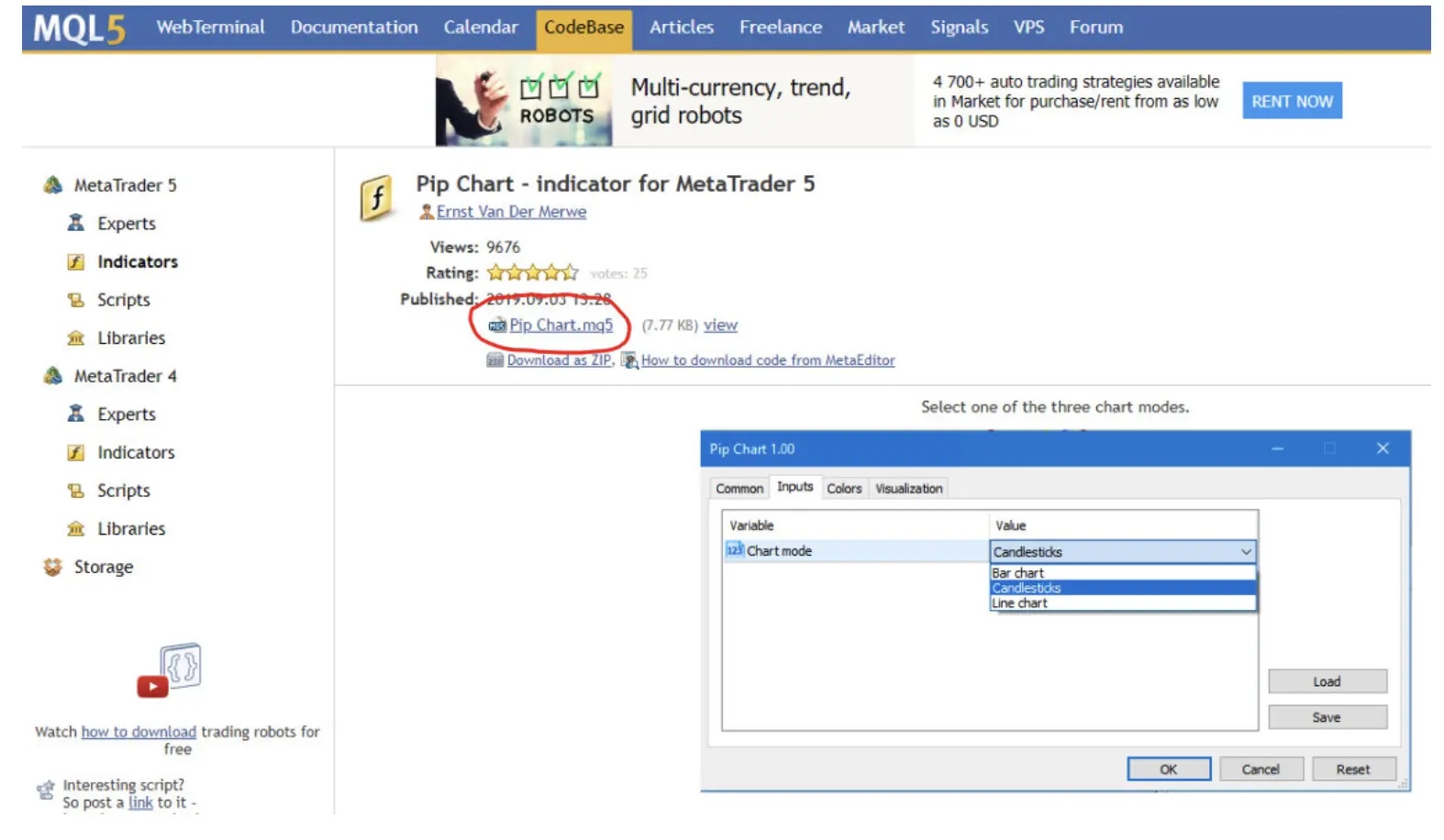
Download the Custom Indicator
Ensure the indicator file is in ‘.ex5’ format.
Install the Indicator
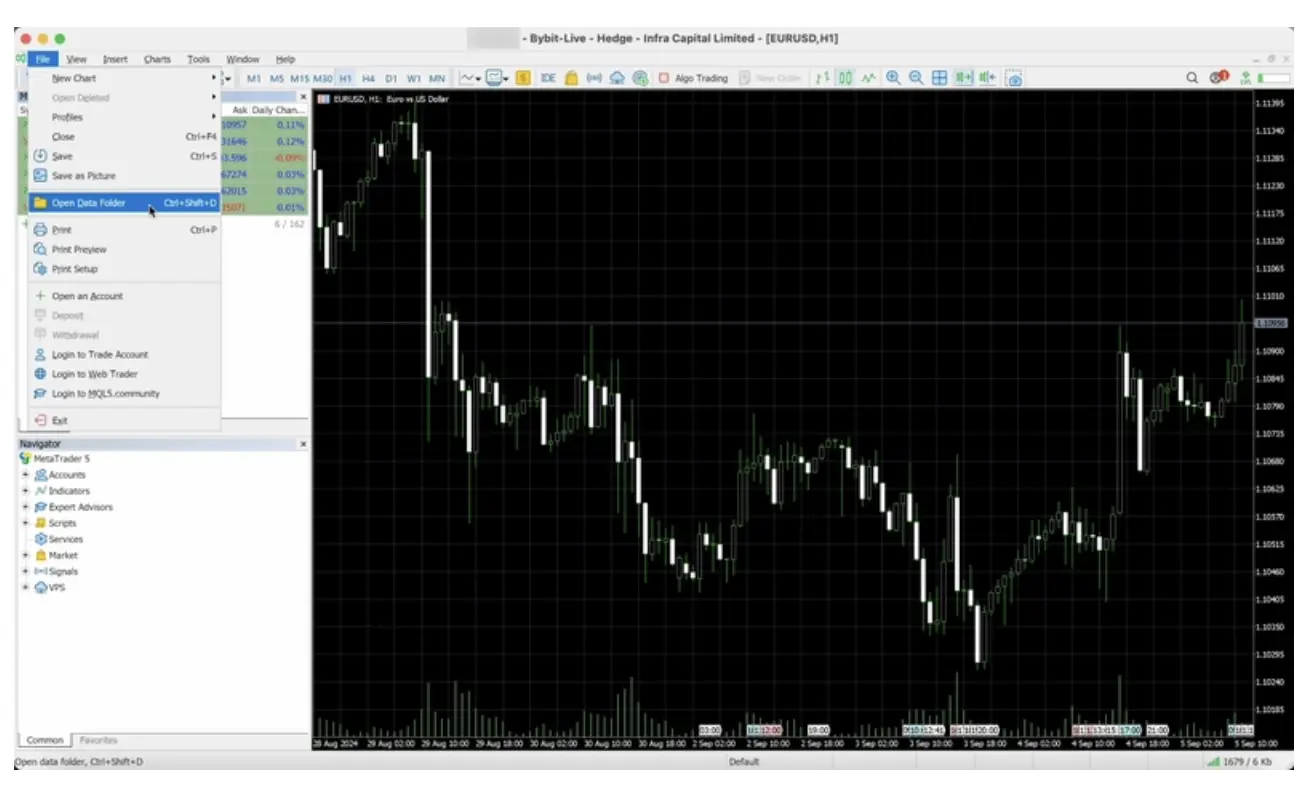
In MT5, go to ‘File’ > ‘Open Data Folder’.
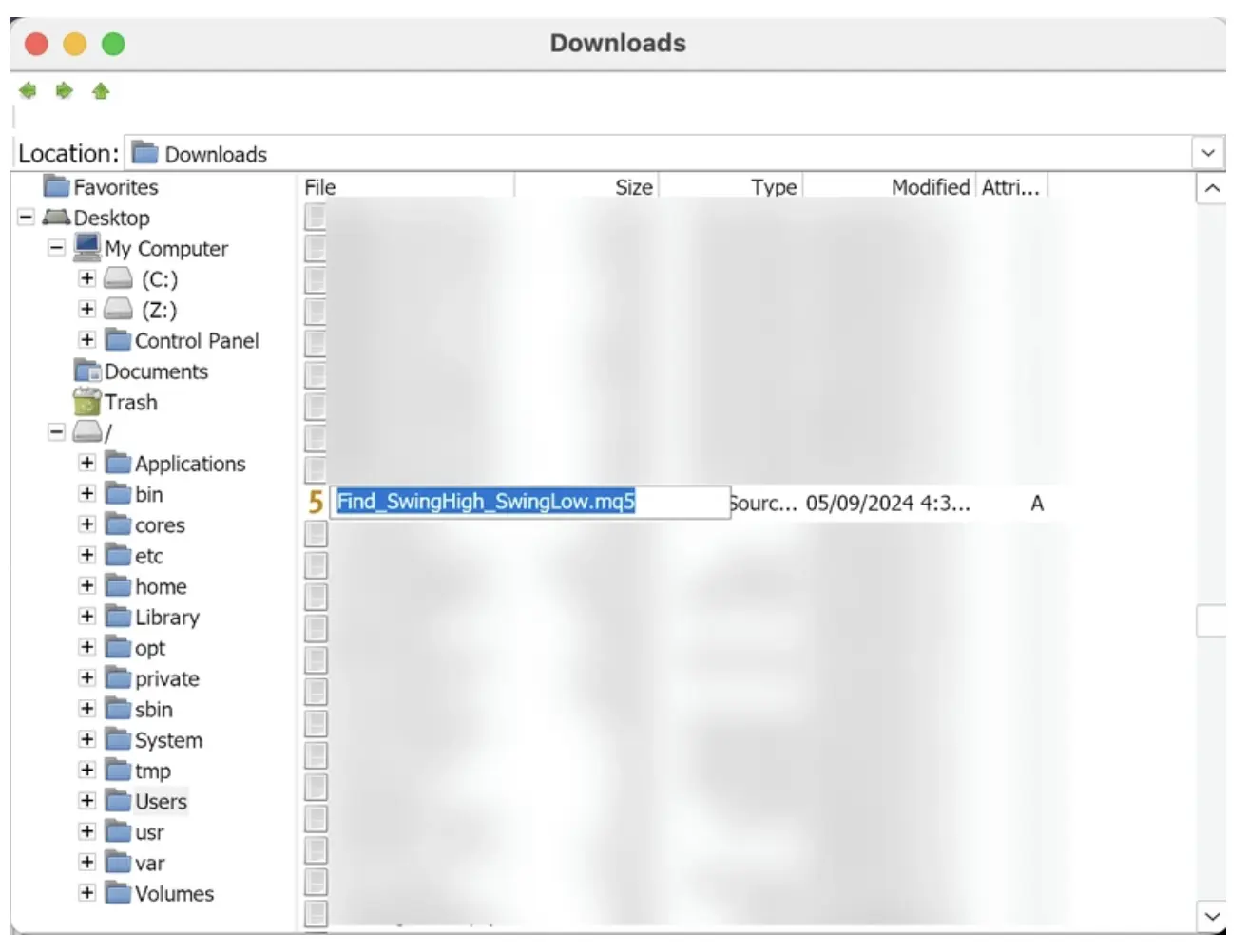
Open the ‘MQL5’ folder, then the ‘Indicators’ folder.
Copy the downloaded ‘.ex5’ file into this folder.
Restart MT5
Close and reopen the platform to enable the new indicator.
Add the Indicator to a Chart
Open the desired chart.
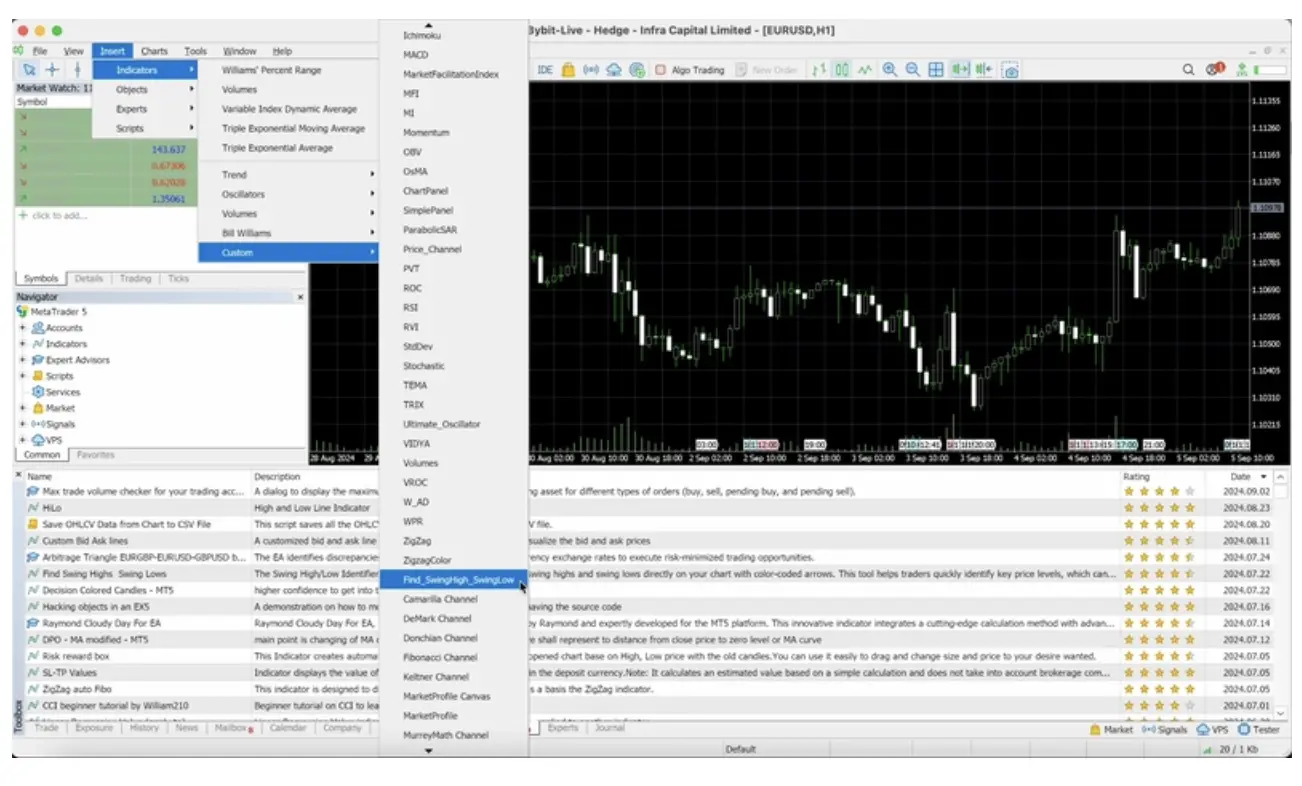
Navigate to ‘Insert’ > ‘Indicators’ > ‘Custom’ and select the installed indicator.
This process allows for the seamless integration of custom indicators tailored to specific trading strategies.
Popular Technical Indicators for Better Trading Decisions
MT5 offers a variety of indicators that cater to different analytical needs:
Trend Indicators
Moving Averages (MA): Smooth out price data to identify the direction of the trend. Variants include Simple Moving Average (SMA) and Exponential Moving Average (EMA).
Bollinger Bands: Consist of a moving average and two standard deviation lines, helping to identify periods of high or low volatility and potential overbought or oversold conditions.
Ichimoku Cloud: Provides information on support and resistance levels, trend direction, and momentum.
Momentum Indicators
Relative Strength Index (RSI): Measures the magnitude of recent price changes to evaluate overbought or oversold conditions on a scale of 0 to 100.
Moving Average Convergence Divergence (MACD): Shows the relationship between two moving averages of a security’s price, aiding in identifying trend direction and momentum.
Stochastic Oscillator: Compares a particular closing price of a security to a range of its prices over a certain period, useful for identifying potential reversal points.
Volatility Indicators
Average True Range (ATR): Measures market volatility by decomposing the entire range of an asset price for that period.
Volume Indicators
On-Balance Volume (OBV): Uses volume flow to predict changes in stock price.
Volume Weighted Average Price (VWAP): Gives the average price a security has traded at throughout the day, based on both volume and price.
Best Practices for Using Technical Indicators on MetaTrader 5
Avoid Over-Reliance on a Single Indicator: Use a combination of indicators to confirm signals and reduce the risk of false positives.
Combine Indicators for Stronger Confirmations: Pairing trend indicators with momentum indicators can provide more robust analysis.
Backtest Strategies Using Historical Data: Evaluate the effectiveness of your strategy by testing it against past market data.
Manage Risk with Stop-Loss and Take-Profit Levels: Implementing these tools can help protect against significant losses and secure profits.
Common Mistakes to Avoid
Misinterpreting Signals Due to Lack of Confirmation: Always cross-check indicator signals with other tools or market factors. A single indicator might show a buy signal, but without supporting data, acting on it could lead to losses.
Using Too Many Indicators: This can lead to ‘analysis paralysis’. Stick to a combination of 2–3 indicators that complement each other and suit your trading style.
Ignoring Fundamental Analysis: While technical indicators and tools are powerful, ignoring macroeconomic news or earnings reports can result in missed context or unexpected price swings.
Your Strategy’s Secret Weapon: Technical Indicators
Technical indicators are essential companions in every trader’s toolbox. Whether you’re trying to catch a trend early, time an entry point, or manage your risk, these tools provide structure and clarity in an otherwise chaotic market.
By learning how to effectively use MT5 indicators and customising them to fit your strategy, you can turn complex market data into actionable insights. Just remember — no tool works in isolation. Success lies in combining the right indicators with solid risk management and market awareness.
Ready to make better trades?
Start exploring technical indicators on MetaTrader 5 with BitDelta Pro today and elevate your trading strategy.
Scalping vs Swing Trading: Which Strategy Works Best on MT5?
Key Takeaways
Scalping is ideal for fast-paced traders who thrive on quick decisions and multiple trades per day, while swing trading suits those who prefer fewer, more calculated trades over days or weeks.
MetaTrader 5 (MT5) supports both strategies with powerful features like advanced charting, multi-timeframe analysis, Expert Advisors, and one-click trading.
Scalping requires precision, speed, and high focus, and it works best during high-liquidity trading sessions.
Swing trading is more strategic and less time-intensive, relying on trend analysis and economic news for bigger gains per trade.
Platforms like BitDelta Pro offer seamless MT5 integration, making it easy to test and execute either strategy with efficiency and security.
Trading isn’t just about buying low and selling high – it’s about how and when you do it. That’s where strategies like scalping and swing trading come into play. Both can be effective, but choosing the right one depends on your goals, risk appetite, and how much time you’re willing to commit.
Thanks to powerful platforms like MetaTrader 5 (MT5), you’ve got everything you need to support either style – from lightning-fast order execution for scalpers to advanced charting tools for swing traders. Let’s dive into the difference between scalping trading and swing trading, how each works, and which one might be your best bet on MT5.
Understanding Scalping in Trading
What is Scalping Trading?
Scalping is like speed-dating in the trading world. It’s all about entering and exiting trades within seconds or minutes to snag small, quick profits. Scalpers often place dozens – sometimes hundreds – of trades in a day.
How Scalping Trading Works on MT5?
MT5’s one-click trading, ultra-fast execution, and low-latency environment are a dream for scalpers. You can customise templates, use Expert Advisors (EAs), and monitor Level 2 pricing to make split-second decisions.
Key Characteristics of Scalping
Trades last for seconds to a few minutes.
Focused on tiny price movements – think 5 to 10 pips.
High trade volume for accumulating profits.
Requires razor-sharp focus and quick reaction times.
Works best during high-liquidity sessions like the London or New York open.
Pros and Cons of Scalping Trading
Pros:
Quick returns.
Minimises overnight risk.
There are plenty of trading opportunities daily.
Cons:
Mentally and emotionally exhausting.
Requires a solid internet connection and top-tier execution speed.
High transaction costs if the spread or commissions are unfavourable.
Best Indicators and Tools for Scalping Trading on MT5
Swing trading is like catching waves – you aim to ride medium-term price movements over a few days or even weeks. It’s a favourite among part-time traders who prefer fewer, more calculated trades. But is swing trading profitable? Absolutely, if done with proper analysis and discipline.
How Swing Trading Works on MT5?
With MT5’s multi-timeframe analysis, economic calendar, and custom indicators, swing traders can assess both technical and fundamental cues. You don’t need to be glued to your screen 24/7 – just a few quality setups are enough.
Key Characteristics of Swing Trading
Trades last from several days to a few weeks.
Focused on trend reversals or continuation patterns.
Less stressful than scalping – more time to analyse and decide.
Leverages both technical and macroeconomic factors.
Pros and Cons of Swing Trading
Pros:
Suitable for those with limited screen time.
Less pressure – no need to make snap decisions.
Potential for larger price moves and profits.
Cons:
Exposure to overnight and weekend market risks.
Requires patience – setups take time to materialise.
Bigger stop-losses needed due to wider price swings.
Best Indicators and Tools for Swing Trading on MT5
MACD: For trend confirmation.
Fibonacci Retracements: To spot pullback levels.
Support & Resistance Zones: To identify entry/exit points.
Fundamental Analysis Tools: MT5’s built-in news feed is great for this.
Key Differences Between Scalping and Swing Trading
Feature
Scalping Trading
Swing Trading
Trade Duration
Seconds to minutes
Days to weeks
Number of Trades
Dozens to hundreds per day
Few trades per week
Time Commitment
High – constant monitoring
Moderate – periodic analysis
Stress Level
High
Medium
Profit Per Trade
Small but frequent
Larger but less frequent
Best Suited For
Fast decision-makers
Strategic thinkers
Platform Requirement
Fast execution, low latency
Strong charting and analysis tools
Risk Exposure
Low per trade
Higher per trade
This table sums up the swing trading vs scalping debate at a glance.
What is MetaTrader 5 (MT5)?
MetaTrader 5 (MT5) is a powerful multi-asset trading platform designed for active traders. Built as the successor to MT4, it offers enhanced speed, deeper analytics, and broader market access. Whether you’re into forex, stocks, crypto, or commodities, MT5 equips you with the tools needed to trade smartly and efficiently.
Key Features of MT5
Multi-asset support: Trade forex, indices, stocks, and more from one platform.
Economic calendar: Stay ahead with real-time global news and data.
Expert Advisors (EAs): Automate your strategies with custom or pre-built trading bots.
Depth of Market (DOM): Get insights into order flow and market liquidity.
MT5 is fast, flexible, and customisable, making it a go-to platform for both scalping and swing trading strategies.
Which Strategy Works Best on MT5?
The real beauty of MT5 is that it doesn’t play favourites – it’s equipped for both high-speed and long-term strategies.
MT5’s Features That Support Both
Advanced Charting Tools
Multiple Timeframes
Expert Advisors (EAs)
One-Click Trading
Depth of Market (DOM)
Economic Calendar & News Feeds
Choosing the Right Strategy Based On
Your Personality: Fast-paced and decisive? Go for scalping. Patient and analytical? Try swing trading.
Time Availability: Full-time commitment favours scalping. Swing suits those with other priorities.
Capital & Risk Appetite: Scalping often needs more capital due to tighter margins. Swing trading can be done with moderate capital but demands better risk management.
Tips for Success in Both Strategies on MT5
For Scalpers
Stick to highly liquid pairs like EUR/USD or GBP/USD.
Use tight spreads – even a 1 pip difference can impact profits.
Rely on low-latency servers and quick execution brokers.
Always set stop-losses – the market moves fast, and you don’t want to blink and lose.
For Swing Traders
Use a combination of technical indicators and news analysis.
Maintain a journal – track trade setups, results, and patterns.
Adjust stop-losses dynamically as the market moves in your favour.
Stay informed with weekly economic releases – they can shift trends overnight.
Start Trading with BitDelta Pro
Whether you’re a rapid-fire scalper or a patient swing trader, BitDelta Pro is built to supercharge your MT5 experience.
Why BitDelta Pro?
Seamless MT5 Integration: Trade scalping and swing strategies effortlessly.
Low Spreads & Fast Execution: Ideal conditions for fast-paced trades.
Advanced Charting Tools: All the indicators and drawing tools swing traders need.
Secure & Regulated: Your funds and data are protected.
Trade Across Markets: CFDs in forex, crypto, indices, and more with deep liquidity.
Pro Tip: Open a demo account on BitDelta Pro and experiment with both strategies before trading live.
Choose Smart, Trade Smarter with MT5
Both scalping and swing trading are effective – but the right one depends on you. MT5 provides the tech muscle to make either strategy work.
Scalping is all about speed and precision. Swing trading is more of a waiting game with the potential for bigger wins.
Try both styles, understand what fits your mindset and schedule, and use the tools at your disposal wisely. And remember – whether you’re scalping for minutes or swinging for weeks, consistency and discipline are what win the race.